Choosing Between Google, Amazon, & iCloud Photos

I recently went down the rabbit hole of figuring out if I am using the right solution for offsite storage of my photo library. I've been using iCloud Photos for over a year and am not totally happy with the solution. I decided to try out both Amazon Prime Photos and Google Photos. My home Internet connection has a 5Mb/s upload speed which feels pathetically slow. I wanted to test each solution with a good chunk of my photo library uploaded which made this a time-consuming experience. Here's what I came up with after about two weeks of futzing. ...
March 19, 2017 · 8 min · Aaron

Another day, another set of iTunes Connect errors

November 4, 2016 · 0 min · Aaron

Easy Mac to Mac Screen Sharing

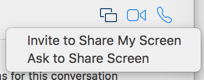
Screen sharing over iMessage is not a terribly well-known feature of Mac OS X - but it's incredibly awesome and easy to use. The only requirements are the person needs a relatively new Mac OS X install (Yosemite or higher) and iMessage enabled on their Mac. In Messages, find your existing conversation (or create a new one with the user).Click the Details button up top and click it.Find the little icon that looks like two squares with an offset between them and click it.Select Ask to Share Screen.The other person should get a notice and they can accept it.Once you're sharing you are in view-only mode - you have to click the icon in the upper left to request control of their desktop.Pretty simple! I've had some issues in the past with the notifications never coming through for screen sharing but it seems to be resolved with Mac OS X 10.11 (El Capitan). ...

November 3, 2015 · 1 min · Aaron

This feature is temporarily unavailable

While updating a few apps today, the Apple App Store is giving me this super helpful error message. Temporarily Unavailable - This feature is temporarily unavailable. Try again later.I hadn't realized updating/installing apps was a feature!

October 28, 2015 · 1 min · Aaron

Extending your Apple Watch with WiFi

WiFi on Apple Watch!?It's not completely obvious but the Apple Watch supports WiFi networks starting in Watch OS 2.0. How does one configure WiFi to work with the Watch? It's not terribly obvious so I threw this guide together. My SituationMy Apple Watch was not configured to work with WiFi. I have both 5GHz and 2.4GHz networks in my home. I normally do not join the 2.4GHz network because it doesn't work as well as the 5GHz. I looked at the Apple Support page on WiFi for the Apple Watch and realized my situation. Apple Watch only supports 2.4GHz networks. ...

October 27, 2015 · 2 min · Aaron

Even Apple Leaves TODOs in Production Code

My credit card got charged today for my Apple Watch which wasn't supposed to ship until June. I was so excited that I tweeted the shipping notification to sarcastically note the availability in June still. Copying that text into a tweet, I actually got: Preparing for Shipment TODO: Pull info bubble content div up to the order list level (only need 1 per page) and refactor info bubbles into single conditional & span based on group status type OR alternatively, refactor to single info bubble per delivery group based on status shipped shipped Available to ship: June ...

April 22, 2015 · 1 min · Aaron

Apple at 9:41am

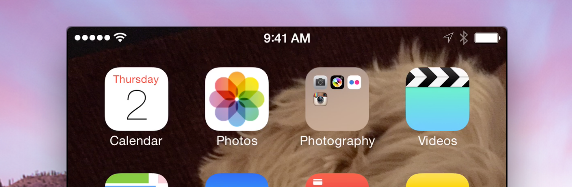
In my post on using QuickTime to record an iOS device I mentioned the carrier and time are fixed at simple dots and 9:41am. Why 9:41am? Well I knew there was a reason behind it and did a quick search to review the reason. January 9th 2007 .. iPhone announcement day .. 9:41am: Source: http://www.engadget.com/2007/01/09/live-from-macworld-2007-steve-jobs-keynote/

April 3, 2015 · 1 min · Aaron

Creating your Verse in the Play that is Life

I've recently become a fan of Walt Whitman's poem from 1892 entitled "O Me! O Life!". I've heard the poem in the past but it has never resonated with me until hearing Daniel Steinberg, an iOS developer and trainer, used it in his keynote at CocoaConf Chicago. O Me! O Life! Oh me! Oh life! of the questions of these recurring, Of the endless trains of the faithless, of cities fill’d with the foolish, Of myself forever reproaching myself, (for who more foolish than I, and who more faithless?) Of eyes that vainly crave the light, of the objects mean, of the struggle ever renew’d, Of the poor results of all, of the plodding and sordid crowds I see around me, Of the empty and useless years of the rest, with the rest me intertwined, The question, O me! so sad, recurring—What good amid these, O me, O life? ...

March 29, 2015 · 2 min · Aaron

Mac OS X 10.9 Mavericks Calendar + Google Sync Problems

On occasion my Calendar on Mavericks gets hosed when syncing with Google. If I look in the console, I see errors like the following mentioning "An error exists on principal": 6/5/14 10:05:00.337 AM Calendar[59555]: [com.apple.calendar.ui.log] [An error exists on principal: [iCloud]] 6/5/14 10:05:00.338 AM Calendar[59555]: [com.apple.calendar.ui.log] [An error exists on principal: [Time Off]] 6/5/14 10:05:00.340 AM Calendar[59555]: [com.apple.calendar.ui.log] [An error exists on principal: [Events]] 6/5/14 10:05:00.341 AM Calendar[59555]: [com.apple.calendar.ui.log] [An error exists on principal: [Launch]] 6/5/14 10:05:00.341 AM Calendar[59555]: [com.apple.calendar.ui.log] [An error exists on principal: [Conferences]] 6/5/14 10:05:00.342 AM Calendar[59555]: [com.apple.calendar.ui.log] [An error exists on principal: [Some Team]] ...

June 5, 2014 · 2 min · Aaron

Apple's Public Mailing Lists

You may not be aware but Apple has a pretty extensive set of public e-mail discussion lists. https://lists.apple.com/mailman/listinfo There are topics ranging from fundamental Objective-C issues through to development for their various desktop applications. Some of the lists are quite chatty but you can subscribe in digest format to get a daily e-mail instead of each individual message. This is a great way to reach engineers working on the piece you're interested in and is a quite interesting place to lurk.

April 23, 2014 · 1 min · Aaron