Plex Media Server not showing updates

Since November of last year (roughly) I've noticed that the Plex Media Server app doesn't ever show that there are updates available. I've manually reinstalled the latest server copy several times and it still hasn't updated automatically. I found a solution that resolves this. On macOS you have to delete a preference key for the last time the server was updated. A borked version got released which had a higher numerical value causing the server to never find an update. ...

April 19, 2018 · 1 min · Aaron

Installing Icecast 2 on DreamHost VPS

Weather Underground Radio StreamsWeather Underground provided a free service to host all of these streams so you could listen into important weather bulletins over the Internet. Weather Underground was purchased by the Weather.com parent company The Weather Company in 2012 and then IBM purchased The Weather Company in 2016. Weather Underground moved all of their services over to Amazon Web Services and canned a few legacy products including the NOAA Weather Radio streams. ...

March 5, 2017 · 7 min · Aaron

SourceTree - Delete Multiple Branches at One Time

Do you use SourceTree to help manage your Git repos? Ever work on a bunch of pull requests and have a lot of local branches you need to delete? I found a way to delete multiple branches at one time. Click Repository then click Branch.Click Delete Branches.Select the branch(es) you want to delete. Be sure not to select other than Local branches unless that's your intention.

December 10, 2015 · 1 min · Aaron

Changing the volume on a USB Headset on Mac OS X

Do you use a USB headset for video/audio conferencing on your Mac? Ever been frustrated that you can't really change the volume of just the headset if you keep your main audio coming through your speakers? There is a solution - use the Audio MIDI Setup app nestled in Applications/Utilities. Look for the device that matches your USB device - sometimes it only shows the manufacturer of the USB to Analog converter if its a cheapie device.Look for the "out" device if you're looking at changing what you hear, the "in" device for your microphone audio level.Slide the master control to the right if its available. If master isn't selectable, slide the individual left/right channels. The individual channels don't stop at any specific points along the line so you might want to manually match up the dB (gain) value so each ear is an identical volume level.

December 7, 2015 · 1 min · Aaron

Easy Mac to Mac Screen Sharing

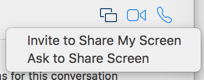
Screen sharing over iMessage is not a terribly well-known feature of Mac OS X - but it's incredibly awesome and easy to use. The only requirements are the person needs a relatively new Mac OS X install (Yosemite or higher) and iMessage enabled on their Mac. In Messages, find your existing conversation (or create a new one with the user).Click the Details button up top and click it.Find the little icon that looks like two squares with an offset between them and click it.Select Ask to Share Screen.The other person should get a notice and they can accept it.Once you're sharing you are in view-only mode - you have to click the icon in the upper left to request control of their desktop.Pretty simple! I've had some issues in the past with the notifications never coming through for screen sharing but it seems to be resolved with Mac OS X 10.11 (El Capitan). ...

November 3, 2015 · 1 min · Aaron

Biggest Lie To Your ADHD Self

Most of my journey the past couple of years with coping with attention problems is increasing my self-awareness. I am my own obstacle and I must hack my own consciousness to work the way I need it to. It's easy to slip into old habits and totally forget the tools you've put in place. All it takes is one of those well-known "ooh shiny" moments and you're off track for an hour reading about nuclear testing instead of solving the problem for work. ...

July 15, 2015 · 2 min · Aaron

Recording Your iOS Device with QuickTime Player

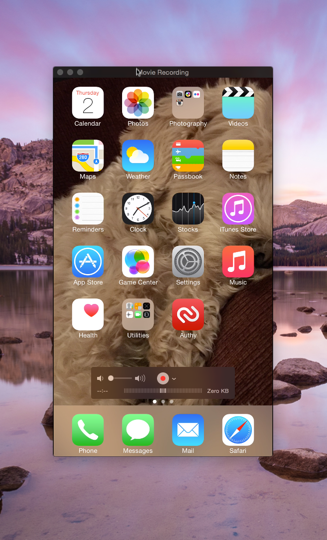
The TaskYou need to record your iPhone or iPad's screen to show someone a bug or demo a feature to your customers. In the past the only method available was to use a program like Reflector to emulate an AirPlay/Apple TV and then record on your machine. This works fairly decently although the quality over WiFi isn't very good leaving you with a less-than-crisp recording. Reflector also isn't free which makes it difficult for users in the wild to record bugs. ...

April 2, 2015 · 3 min · Aaron

Providing Emergency Contacts with iOS 8

The ProblemSomething that has been missing on iOS for a long time is a reliable way to provide emergency contact information. Imagine you're out and about and you end up having an accident or have an acute attack from a known medical condition you have. We all tend to carry our mobile phones with us. Most emergency personnel are trained to review personal data in your wallet/purse and now mobile phones. The issue is most of us have a lock code on our devices, preventing access to potential life-saving communication with a loved one about your medical condition. ...

November 3, 2014 · 2 min · Aaron

Mac OS X 10.9 Mavericks Calendar + Google Sync Problems

On occasion my Calendar on Mavericks gets hosed when syncing with Google. If I look in the console, I see errors like the following mentioning "An error exists on principal": 6/5/14 10:05:00.337 AM Calendar[59555]: [com.apple.calendar.ui.log] [An error exists on principal: [iCloud]] 6/5/14 10:05:00.338 AM Calendar[59555]: [com.apple.calendar.ui.log] [An error exists on principal: [Time Off]] 6/5/14 10:05:00.340 AM Calendar[59555]: [com.apple.calendar.ui.log] [An error exists on principal: [Events]] 6/5/14 10:05:00.341 AM Calendar[59555]: [com.apple.calendar.ui.log] [An error exists on principal: [Launch]] 6/5/14 10:05:00.341 AM Calendar[59555]: [com.apple.calendar.ui.log] [An error exists on principal: [Conferences]] 6/5/14 10:05:00.342 AM Calendar[59555]: [com.apple.calendar.ui.log] [An error exists on principal: [Some Team]] ...

June 5, 2014 · 2 min · Aaron

Xcode 4 - Problem submitting App with Static Library

I'm submitting a new version of my Migraine Diary App to the App Store and was running into problems with Xcode 4 giving me the following error: "[Your App Name] does not contain a single-bundle application or contains multiple products. Please select another archive, or adjust your scheme to create a single-bundle application." There is an issue or maybe it's an intentional design thing with Xcode 4 and how it handles statically built libraries being included in your project. I'm specifically using Core Plot and it's instruction set hasn't been updated for Xcode 4 yet. Here are the things I had to do to get Core Plot to bundle correctly with my App to submit it: ...

March 28, 2011 · 1 min · Aaron