My Favorite Screenshot Tool - SnagIt

I've been using Techsmith's SnagIt for years for taking screenshots. It started as a Windows-only product but then a Mac version came out. It's extremely simple to use and has most everything I want for a quick image including cropping, border effects, transparency, and annotations like arrows and text. What's your favorite screenshot and annotation tool?
November 30, 2015 · 1 min · Aaron

Easy Mac to Mac Screen Sharing

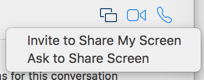
Screen sharing over iMessage is not a terribly well-known feature of Mac OS X - but it's incredibly awesome and easy to use. The only requirements are the person needs a relatively new Mac OS X install (Yosemite or higher) and iMessage enabled on their Mac. In Messages, find your existing conversation (or create a new one with the user).Click the Details button up top and click it.Find the little icon that looks like two squares with an offset between them and click it.Select Ask to Share Screen.The other person should get a notice and they can accept it.Once you're sharing you are in view-only mode - you have to click the icon in the upper left to request control of their desktop.Pretty simple! I've had some issues in the past with the notifications never coming through for screen sharing but it seems to be resolved with Mac OS X 10.11 (El Capitan). ...

November 3, 2015 · 1 min · Aaron

Recording Your iOS Device with QuickTime Player

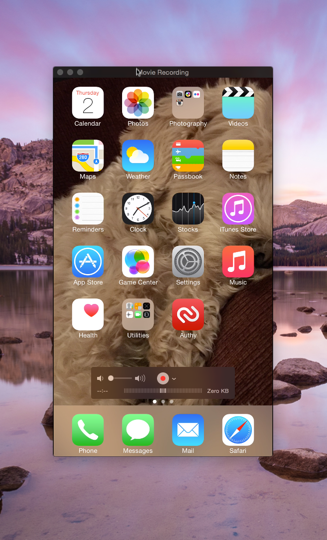
The TaskYou need to record your iPhone or iPad's screen to show someone a bug or demo a feature to your customers. In the past the only method available was to use a program like Reflector to emulate an AirPlay/Apple TV and then record on your machine. This works fairly decently although the quality over WiFi isn't very good leaving you with a less-than-crisp recording. Reflector also isn't free which makes it difficult for users in the wild to record bugs. ...

April 2, 2015 · 3 min · Aaron

Oh My Zsh Error About Battery

I recently got a new work computer and instead of using Time Machine to restore, I decided to install everything fresh. I installed Oh My Zsh (which is fantastic by the way) which I used on my previous machine. My favorite theme is Candy Kingdom. After switching and relaunching Terminal I noticed the following error after every command prompt display: zsh: command not found: battery_time_remaining Turns out it was a simple problem - I had to enable the battery plugin in my ~/.zshrc config file: ...

November 17, 2014 · 1 min · Aaron

Mac OS X Server Time Machine Volume Filling Too Fast

I've been noticing on my Mac OS X Mavericks 10.8 Server I have running in a data center has been filling up its Time Machine volume way too quickly. The backups are continually huge and only about a week fits on the second hard drive inside of the Mac mini. Every time the machine backed up it was taking up so much room that previous backups had to be deleted. ...

August 21, 2014 · 2 min · Aaron

Mac OS X 10.9 Mavericks Calendar + Google Sync Problems

On occasion my Calendar on Mavericks gets hosed when syncing with Google. If I look in the console, I see errors like the following mentioning "An error exists on principal": 6/5/14 10:05:00.337 AM Calendar[59555]: [com.apple.calendar.ui.log] [An error exists on principal: [iCloud]] 6/5/14 10:05:00.338 AM Calendar[59555]: [com.apple.calendar.ui.log] [An error exists on principal: [Time Off]] 6/5/14 10:05:00.340 AM Calendar[59555]: [com.apple.calendar.ui.log] [An error exists on principal: [Events]] 6/5/14 10:05:00.341 AM Calendar[59555]: [com.apple.calendar.ui.log] [An error exists on principal: [Launch]] 6/5/14 10:05:00.341 AM Calendar[59555]: [com.apple.calendar.ui.log] [An error exists on principal: [Conferences]] 6/5/14 10:05:00.342 AM Calendar[59555]: [com.apple.calendar.ui.log] [An error exists on principal: [Some Team]] ...

June 5, 2014 · 2 min · Aaron

Mavericks USB Hub Oddities

I have the strangest glitch happening with Mac OS X Mavericks and I can't find anyone else describing the same issue. I have a D-Link DUB-H7 USB 2.0 hub connected to my Thunderbolt Display which is in turn connected to my retina 15" MacBook Pro. If I cold boot with this hub connected to my Thunderbolt Display, both the USB external keyboard (not connected to the hub) and the built-in keyboard have a number of keys that do not function. I, J, M and a few others I know of offhand that don't work. As soon as I disconnect the hub, both keyboards work perfectly. Also, after I log into Mavericks, the keyboards work fine regardless of the hub being connected or not. ...

April 9, 2014 · 1 min · Aaron

Mac OS X - Adding a loopback alias

I do a lot of local web development on my MacBook Pro. Frequently I had multiple tiers of servers running - a Jetty instance running the web tier and a JBoss/EJB server doing the business tier behind it. The problem is JBoss opens up so many ports on a particular network adapter and trying to get JBoss and Jetty to share a single IP is a nightmare. So the easier way is to just create a new IP or alias your localhost (127.0.0.1) into something like 127.0.0.2. When you start up Jetty, you pass in the binding IP of .2 and then JBoss and Jetty place nice with each other. ...

February 4, 2011 · 2 min · Aaron

Installing MySQL 5.5.8 on Mac OS X Snow Leopard

Installing MySQL should be a no brainer on any operating system, especially with how mature of a product it is. Apparently that assumption is incorrect. I tried installing the most recent GA release of MySQL on my new Snow Leopard machine, and found I couldn't start the blasted server. I've become lazy the older I get - I don't want to screw around with shell scripts, hacking this tweaking that. If I'm provided a Mac-based installer I WANT IT TO WORK. So, if you're like me and are frustrated as all hell with not being able to get MySQL to start via System Preferences after installing the 64-bit version (maybe 32-bit as well), do the following: ...

December 21, 2010 · 1 min · Aaron

Mac Screen Sharing (VNC) & White Screen

I've had problems connecting to my Ubuntu 9.10 server via Mac OS' built-in VNC client, "Screen Sharing". Frequently when I connect, I get a white screen with no indication that the connection is working. If I type characters or click the mouse, it does actually send those events to the remote side. My only option was to use Chicken of the VNC (which sucks) to connect to my server. Finally, I did some digging and found the solution/workaround. ...

May 2, 2010 · 1 min · Aaron